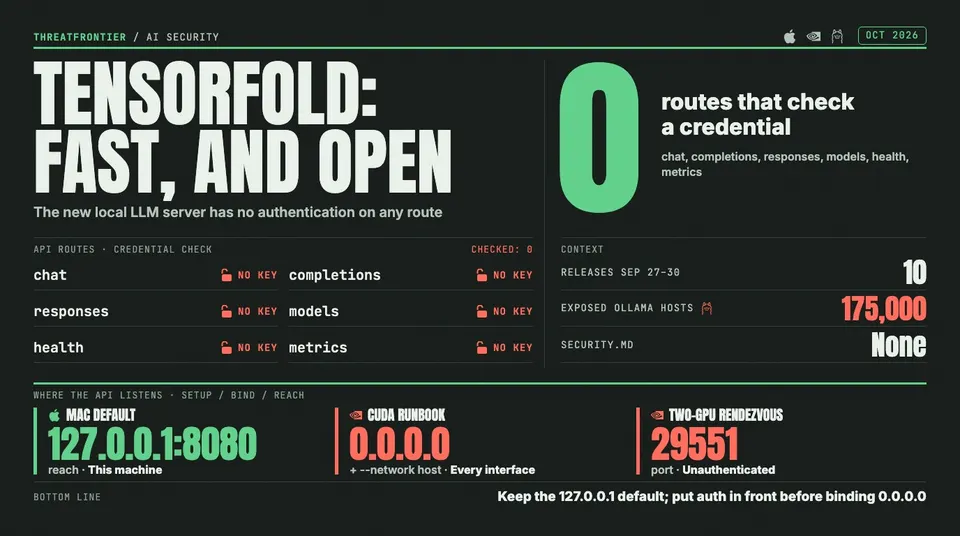
TensorFold's fast OpenAI-compatible LLM server checks no credentials: safe on its localhost default, exposed on the 0.0.0.0 path its CUDA docs give.
TensorFold is the local inference engine people have been passing around this week. Early users report roughly 4x faster decoding on Apple Silicon with output identical to normal decoding, served through an OpenAI-compatible endpoint that any existing client can point at. The project shipped ten releases between September 27 and September 30, went to Apache-2.0 with version 0.6.0, and had 810 GitHub stars and 110 forks by October 2.
We read the v0.6.0 source to see what a team inherits when a developer runs tensorfold serve on a work machine. The engineering is careful in several places. But the server has no authentication of any kind. That is a common design choice for local model servers, and the safety of the whole setup comes down to the listen address.
What TensorFold is
TensorFold serves language models on Apple Silicon through MLX, and on NVIDIA GPUs through CUDA. Its speed comes from exact speculative decoding: draft tokens run through parallel lanes, the model verifies them together, and only tokens that match serial decoding are kept. The supported models include Qwen3.8-27B, Nemotron 3.5 Lightning, GLM-5.3-Flash and Gemma 4.
Both backends expose the same HTTP surface:
| Endpoint | What it does |
|---|---|
POST /v1/chat/completions, POST /v1/completions | Runs a prompt on the loaded model |
POST /v1/responses | OpenAI Responses API, stored in memory by default |
GET / DELETE /v1/responses/{id} | Reads or deletes a stored response |
GET /v1/models | Lists the served model ids |
GET /health | Status, batch size and memory figures |
GET /metrics | Prometheus counters |
No credentials, by design
None of those routes checks a credential. The CLI has no API-key flag, and the request handlers never read an Authorization header. Anyone who can reach the port can run prompts on the model, read the health and metrics data, and use the Responses API.
The default keeps that contained. --host defaults to 127.0.0.1 and the port to 8080, so a plain tensorfold serve on a laptop is reachable only from that machine.
The NVIDIA instructions take a different path. The README and the runbook both start the CUDA server inside NVIDIA's PyTorch container with --network host and pass --host 0.0.0.0. That binds the unauthenticated API to every interface on the host. On a GPU box with a public address, or a DGX Spark on a flat office network, the model is open to everyone who can route to it.
The two-GPU setup adds a second open port. The runbook says plainly that the rendezvous port (29551 by default) and the link between the ranks "are not authenticated: keep them on a private link, or firewall the port to the peer."
Why an open model port matters
This is not a theoretical risk. Ollama has the same design, an unauthenticated API meant for localhost, and its exposed instances are now measured by the hundred thousand:
- Cisco, September 2025: a Shodan study found 1,139 exposed Ollama servers. 214 of them were actively serving models and accepting prompts without authentication.
- SentinelLABS and Censys, January 2026: 175,000 unique Ollama hosts exposed across 130 countries. Nearly 48% supported tool calling. The researchers also traced a criminal service that scans for open instances, checks their quality and resells access.
That resale trade is LLMjacking: someone else's GPU produces spam, disinformation or anything else the buyer wants, and the owner pays for the power. TensorFold speaks the same OpenAI-style routes that the existing scanners already probe, so nothing new is needed to find it.
Localhost is not a wall
Binding to 127.0.0.1 stops other machines. It does not stop the browser on the same machine. We noted two things about how TensorFold's request handling meets the browser:
- It parses any body as JSON. The handlers read the body without checking
Content-Type. A web page can send a cross-origintext/plainPOST, which browsers allow without a preflight, and TensorFold will run it as a normal request. The page cannot read the reply, but it can make the model generate. How far this gets depends on the browser's local-network protections, which vary by browser and version. - It does not check the
Hostheader. That check is the usual defence against DNS rebinding, which turns a hostile page into a same-origin client of a localhost service. Here a successful rebind could read replies and stored responses.
We did not build working attacks for either, and modern browsers keep adding friction for public pages talking to private addresses. But "it only listens on localhost" is a weaker guarantee than it sounds for a service with no credentials.
What the code gets right
Several defaults in the source are more careful than they need to be:
- Image URLs are off. The vision models accept data URLs. Fetching a remote image needs
--vision-urls, and even then onlyhttps://URLs are accepted. That shuts off the obvious server-side request forgery path. - Request bodies are capped at 32 MiB on both backends.
- Stored responses use random ids. The Responses store keeps up to 1,024 responses or 256 MiB in memory, and every id is a random UUID, so an attacker cannot list or guess other users' conversations.
- Weights load as safetensors from Hugging Face, not as pickle files that run code when loaded.
- Updates are pinned to release tags.
tensorfold updateinstalls the newest tagged release rather than whatever is on the main branch. The daily release check can be turned off withTENSORFOLD_NO_UPDATE_CHECK=1.
One thing to know about: setting TENSORFOLD_REQUEST_LOG appends every request body to a file in plain text, with only images redacted. It is useful for replaying traffic and easy to forget about once the debugging is done.
The repository has no SECURITY.md and no published way to report a vulnerability. For a project releasing several times a day, that is the gap most worth closing.
What defenders should do
- Keep the default bind. Run TensorFold on
127.0.0.1and reach it from other machines through an SSH tunnel or a reverse proxy that requires authentication. - Rewrite the CUDA instructions before you use them. Drop
--host 0.0.0.0unless a proxy or firewall sits in front of the port, and do not run--network hoston a machine with a public interface. - Firewall port 29551 to the peer rank on two-GPU setups, or keep the ranks on a private link.
- Look for it on your network. Search for listeners on 8080 that answer
GET /v1/modelswith"owned_by": "tensorfold". That response is a reliable fingerprint. - Leave
--vision-urlsoff unless you need it, and unsetTENSORFOLD_REQUEST_LOGwhen you are done with it. - Pin a version. At this release pace, install a specific tag and review the changelog before upgrading a shared server.
TensorFold is a good piece of engineering, and its laptop defaults are sensible. The risk comes from the copy-paste path to a GPU server, which is the same one that put 175,000 Ollama hosts online.