Alex Kim Threat intelligence editor · Updated Sep 14, 2026, 10:21 AM EDT
ConnectWise patches critical CVSS 9.9 ScreenConnect flaw CVE-2026-84869, exploited in-the-wild to hijack technician machines via reverse endpoint attacks.
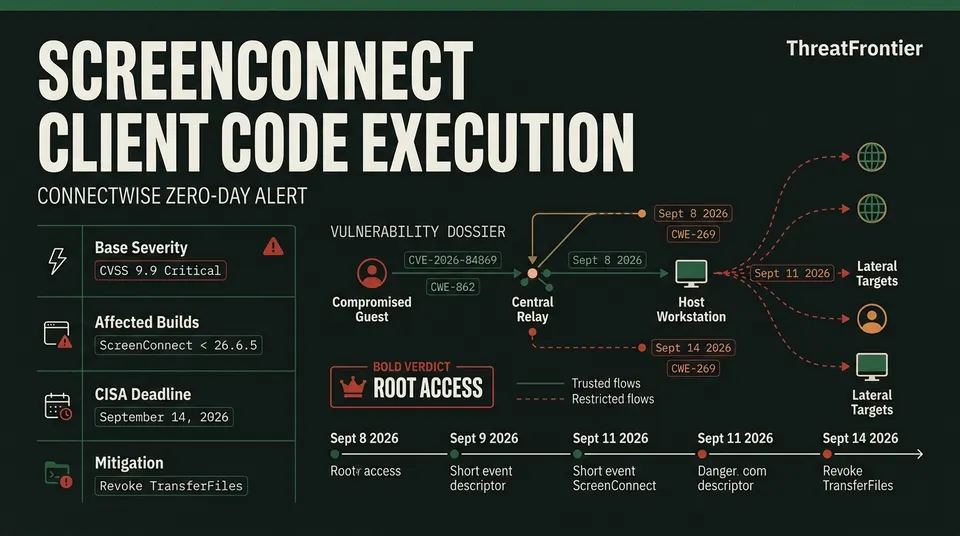
A critical client-side vulnerability in ConnectWise ScreenConnect is under active in-the-wild exploitation, allowing threat actors on compromised endpoints to push arbitrary payloads and silently execute code on connecting technician workstations. Designated as CVE-2026-84869 with a maximum-severity CVSS 9.9 rating, the flaw subverts the traditional remote desktop security paradigm. Rather than targeting a centralized management server, the exploit weaponizes the client transport protocol, transforming compromised endpoints into traps that infect IT support personnel. Remote-support tooling has been a soft target before, as a technical breakdown of the SolarWinds Web Help Desk flaws shows.
Following ConnectWise's advisory and patch release on September 8, 2026, the Cybersecurity and Infrastructure Security Agency (CISA) added the vulnerability to its Known Exploited Vulnerabilities (KEV) catalog on September 11, mandating remediation across federal agencies by September 14, 2026. A similar KEV addition for a Gitea RCE flaw shows how default settings enable host takeover. Forensic investigations conducted by cybersecurity firm Huntress revealed that threat actors have combined social engineering lures with a modular scripting engine to trap connecting technicians, propagating intrusions across support networks.
Phishing MSI Installer
B
Fake Refund Form Lure
1.vbs - 4.vbs Staging Pipeline
System Profiling: 3-Bit State Matrix
Drop Payloads to Public Libraries
F
Technician Workstation Compromised
Quick Assist Support Scam] --> B[Rogue ScreenConnect Client
The flaw resides entirely within the ScreenConnect client binary architecture, spanning CWE-862 (Missing Authorization) and CWE-269 (Improper Privilege Management).
ConnectWise ScreenConnect Client versions prior to 26.6.5
Patched Version
ScreenConnect 26.6.5 (Released September 8, 2026)
Immediate Mitigation
Revoke TransferFiles / TransferFilesInSession permissions across roles
ScreenConnect sessions operate on a two-party model: the Host (the technician initiating remote management) and the Guest (the managed endpoint). A central server relays control and media streams between both parties.
In client versions prior to 26.6.5, authorization checks governing file delivery were evaluated selectively at the initiating client interface rather than strictly enforced and cryptographically validated across session primitives. Consequently, an unprivileged guest endpoint can craft unauthorized file-transfer commands directly across an active session channel.
When a technician connects to a backdoored system, the guest pushes executable payloads straight into the technician's workstation. The host-side ScreenConnect client ingests the inbound data stream, writes the binary to disk, and executes it within the technician's security context. The process triggers without displaying warnings, security prompts, or confirmation dialogues to the operator.
Threat Actor Tactics: Huntress Analysis and Worm-Like Propagation
Intrusion investigations published by Huntress documented adversaries weaponizing rogue ScreenConnect clients through three primary initial access vectors:
Tech Support Scams: Attackers coerced victims into launching Windows Quick Assist, seized interactive control, and silently installed a rogue ScreenConnect client communicating with 45.13.237[.]190 (tele-sync.opik[.]net).
Malvertising & Refund Lures: Fraudulent search results for billing and refund documents delivered rogue ScreenConnect.Client.exe binaries contacting dynamic DNS domain borertors92.anondns[.]net.
Once established on an endpoint, the intrusion executes a four-stage VBScript deployment pipeline. The initial stage, 1.vbs, verifies that physical memory exceeds 5 GB to evade sandboxes, checks standard ScreenConnect installation paths, and inspects running processes for endpoint detection and response (EDR) agents such as CrowdStrike, SentinelOne, Huntress, Sophos, and Cisco AMP. It summarizes these findings into a 3-bit binary string written to %TEMP%\value.txt. The subsequent stages—2.vbs and 3.vbs—read this value, query remote staging links hosted on Dropbox, and fetch targeted, encrypted payloads written to %TEMP%\out.enc. Finally, 4.vbs triggers a PowerShell runner (runner.ps1) to decrypt the archive into %APPDATA%\Microsoft\Windows\Templates\Classic\sys_cache.zip and launch the final script, PyTorchFix.ps1.
The 3-bit profiling value dictates payload delivery based on defensive posture:
State 000 / 001 (Active Third-Party EDR): Deploys an unprivileged ScreenConnect persistence module designed to maintain low-noise access.
State 010 (Standard Windows Environment): Executes privilege escalation tooling targeting Windows User Account Control (UAC) to establish persistent background services.
State 011 (Defender Only / Unmanaged): Systematically disables Windows Defender telemetry, disables Hypervisor-protected Code Integrity (HVCI) and Memory Integrity, deploys network proxies, and launches an XMRig cryptominer. Defender itself has faced direct zero-day pressure too: BlueHammer, a Microsoft Defender zero-day escalating to ransomware priority, after its own CISA KEV listing.
On systems operating in states 010 and 011, 4.vbs stages the infection suite into C:\Users\Public\Libraries\Default\Lib\Lib1\. The script monitors local ScreenConnect processes for inbound administrative connections. When an IT technician connects to troubleshoot the machine, the guest client weaponizes CVE-2026-84869 to transmit the staging suite back into the technician’s host workstation. The malware logs the active ConnectionID to prevent re-infecting the same session; however, upon disconnection, the script purges the identifier. If a secondary engineer subsequently connects to triage the anomaly, the trap re-arms and executes again. A comparable social-engineering-to-zero-day pipeline played out inside Copy2Pwn, the Windows SmartScreen zero-day exploited by DarkGate.
Detection and Hunting Telemetry
Security teams should sweep endpoints for non-standard ScreenConnect services, suspicious process spawning, and known staging paths.
Microsoft Defender for Endpoint / Sentinel (KQL)
// Detect ScreenConnect processes launching script interpreters or command shells
DeviceProcessEvents
| where InitiatingProcessFileName in~ ("ScreenConnect.ClientService.exe", "ScreenConnect.Client.exe", "ConnectWiseControl.Client.exe")
| where FileName in~ ("wscript.exe", "cscript.exe", "powershell.exe", "pwsh.exe", "cmd.exe", "mshta.exe")
| project Timestamp, DeviceName, InitiatingProcessFileName, InitiatingProcessCommandLine, FileName, ProcessCommandLine, AccountName
| order by Timestamp desc
PowerShell Host Triage Script
<#
.SYNOPSIS
 ScreenConnect CVE-2026-84869 High-Fidelity Artifact Sweep
#>
Write-Output "[*] Auditing ScreenConnect Services and Run Key Persistence..."

# 1. Flag ScreenConnect services executing outside Program Files
Get-CimInstance Win32_Service | Where-Object {
 ($_.Name -like "*ScreenConnect*" -or $_.DisplayName -like "*ScreenConnect*") -and
 ($_.PathName -notlike "*C:\Program Files*")
} | Select-Object Name, DisplayName, PathName, State | Format-Table -AutoSize

# 2. Check for known persistence keys and staging artifacts
$RunKey = "HKCU:\Software\Microsoft\Windows\CurrentVersion\Run"
$Persist = (Get-ItemProperty -Path $RunKey -Name "WindowsServiceHost" -ErrorAction SilentlyContinue).WindowsServiceHost
if ($Persist) { Write-Warning "[ALERT] Found persistence key: $Persist" }

$KnownFiles = @("$env:TEMP\1.vbs", "$env:TEMP\value.txt", "C:\Users\Public\Libraries\Default\Lib\Lib1")
foreach ($Path in $KnownFiles) {
 if (Test-Path $Path) { Write-Warning "[ALERT] Staging artifact present: $Path" }
}
Remediation Playbook: Beyond Server Patching
Applying updates strictly to the ScreenConnect server does not resolve CVE-2026-84869. Because the vulnerability is a client-side code execution flaw, a patched server will not protect technicians connecting via outdated host binaries. That same lesson played out with SonicWall's SMA 1000 zero-days, where patch alone is not enough without further hardening. Furthermore, patching binaries does not terminate active sessions or remove existing backdoors.
sequenceDiagram
 autonumber
 actor SOC as Security Administrator
 participant Svr as ScreenConnect Server
 participant Host as Technician Workstation
 participant Client as Managed Endpoint

 Note over SOC,Svr: Phase 1: Immediate Containment
 SOC->>Svr: Revoke 'TransferFiles' across all roles
 SOC->>Svr: Terminate all active sessions & rotate credentials

 Note over SOC,Host: Phase 2: Binary Deployment
 SOC->>Svr: Upgrade server instance to 26.6.5
 SOC->>Host: Reinstall clean Host Client (v26.6.5+)
 SOC->>Client: Execute mass Access Agent upgrade

 Note over SOC,Client: Phase 3: Post-Compromise Scrub
 SOC->>Client: Run IOC sweep; quarantine State 010/011 hosts
 SOC->>Client: Re-image compromised endpoints from clean media
Phase 1: Containment and Role Workaround
Navigate to Administration > Security > Roles in the ScreenConnect console.
For every role across all session groups, uncheck TransferFiles (or TransferFilesInSession on legacy builds) and save. This disables binary ingestion, preventing file push attacks during upgrades.
Force disconnect all active support and access sessions to invalidate existing session tokens.
Enforce multi-factor authentication and audit accounts under Administration > Security > Users to remove unauthorized administrative profiles.
Phase 2: Complete Binary Remediation
Server Upgrade: Update self-hosted deployments to version 26.6.5 or higher (cloud instances are updated automatically by ConnectWise).
Technician Workstation Reinstallation: Technicians must purge local client caches and reinstall the host client binary directly from the updated 26.6.5 server.
Mass Agent Upgrades: From the Host console, issue the Reinstall and Upgrade Access Agent batch command across all managed groups to bring endpoints up to version 26.6.5.
Phase 3: Host Scrubbing and Re-Imaging Mandate
Remove registry persistence at HKCU\Software\Microsoft\Windows\CurrentVersion\Run\WindowsServiceHost and purge directories under C:\Users\Public\Libraries\Default\Lib\Lib1\ and %APPDATA%\Microsoft\Windows\Templates\Classic\.
Critical Remediation Directive: Any workstation or endpoint exhibiting indicators of state 010 (UAC bypass tools) or state 011 (disabled Defender telemetry, disabled HVCI/Memory Integrity, or dropped miners) must be quarantined, wiped, and re-imaged from clean media. Because the malicious chain systematically alters core operating system protections, in-place remediation cannot guarantee system integrity.